
You can move to an Enterprise plan from a trial account or from an active Business plan.
You can upgrade to the Enterprise plan if you’re on a trial account or an active Business plan. Choose Enterprise if you need higher action limits, more flexible hosting, or additional services such as dedicated support and custom compliance options.
In this article, we’ll show you how to move to an Enterprise plan.
Before you start
Here are a few things to know before you start:
- Your trial account stays active for 30 days. If you don’t subscribe after the trial, your account and data are permanently deleted.
- The plan is arranged through our sales team. It isn’t available through automated checkout.
- The Enterprise plan is billed annually or can be paid for multiple years in advance.
- Enterprise includes three plan tiers. The plans start at 1 million actions per month. Plans go up to 500M, with a custom tier from 2 million and no upper limit. Read more
Upgrade to an Enterprise plan
To upgrade to an Enterprise plan, follow these steps:
1. Log in to Piwik PRO.
2. Click Upgrade in the top-right corner, or navigate to Menu >Administration > Account > Subscription.

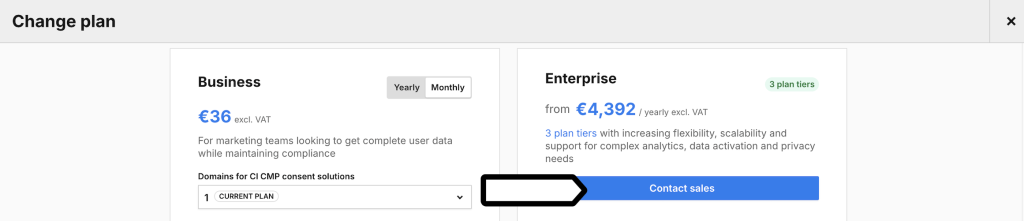
3. In Change plan > Enterprise, click Contact sales.
4. In Contact us, enter your message in the message box.
5. Click Send a message. The sales team will contact you with the next steps.
6. All done!